#   comparison   same_ncol same_names same_class
#   <chr>        <lgl>     <lgl>      <lgl>
# 1 df_a vs df_b TRUE      TRUE       TRUE
# 2 df_a vs df_c TRUE      TRUE       FALSE
# 3 df_a vs df_d TRUE      FALSE      FALSE
# 4 df_b vs df_c TRUE      TRUE       FALSE
# 5 df_b vs df_d TRUE      FALSE      FALSE
# 6 df_c vs df_d TRUE FALSE FALSE Compare multiple dataframes before binding them together
A lightweight R Hack to check structural compatibility across many dataframes
data-wrangling
functions
R-Hacks N.3
This hack is based on my Cyclistic analysis on Kaggle (see Chapter 6.3):
🔗 https://www.kaggle.com/code/lcolon/cyclistic-2023-google-da-capstone-project-r
When working with multiple datasets a common question is:
Are these dataframes really compatible before I bind them together?
People who work with data typically rely on a mix of approaches to answer this:
manual checks (names(), glimpse()), warnings raised by bind_rows(), or dedicated helpers such as compare_df_cols() from the janitor package — which is a solid and widely used solution for comparing column structures.
However, in practice, it is often useful to have a single, lightweight helper that provides a compact and readable overview across many dataframes at once, without additional dependencies or verbose output.
This R Hack introduces a small custom helper function designed with that goal in mind, that you can easily reuse and adapt to your own workflows.
It performs an omnicomprehensive structural comparison before merging, checking column count, column names, and column classes across all pairs of dataframes:
Step 0 – Create example dataframes to compare
To make the idea concrete, let’s create four small dataframes. Some of them match perfectly, others don’t:
df_a <- data.frame(
  id = 1:3,
  value = c(10, 20, 30)
)

df_b <- data.frame(
  id = 4:6,
  value = c(40, 50, 60)
)

# Same columns, but different class for `value`
df_c <- data.frame(
  id = 7:9,
  value = as.character(c(70, 80, 90))
)

# Different column name
df_d <- data.frame(
  id = 10:12,
  amount = c(100, 200, 300)
)
Step 1 – Define the helper function to compare dataframes
The function below takes a vector of dataframe names (as character strings) and compares each unique pair only once. It works in three simple steps:
It loads the dataframes from the environment using their names
It iterates over all unique dataframe combinations, ensuring that each pair is checked only once (for example, it compares
df_avsdf_b, but notdf_bvsdf_a))-
For each pair, it performs the following structural checks and stores the results in a tibble:
- whether the number of columns matches
- whether column names are identical
- whether column classes are the same
The function then binds all tibbles together into a single summary table, making it easy to spot structural mismatches before combining the data.
library(tidyverse)
compare_dataframes <- function(df_names) {

  # Get DF names
  df_list <- lapply(df_names, get)

  # Initialize an empty list
  results <- list()

  # Selection of DF pairs to be compared
  for (i in seq_len(length(df_list) - 1)) {
    for (j in (i + 1):length(df_list)) {

      results[[length(results) + 1]] <- tibble(
        comparison = paste(df_names[i], "vs", df_names[j]),

        # check number of columns
        same_ncol  = ncol(df_list[[i]]) == ncol(df_list[[j]]),

        # check columns name
        same_names = identical(names(df_list[[i]]), names(df_list[[j]])),

        # check columns class
        same_class = identical(
          sapply(df_list[[i]], class),
          sapply(df_list[[j]], class)
        )
      )
    }
  }

  comparison_result <- bind_rows(results)
  return(comparison_result)
}
Step 2 – Apply the function
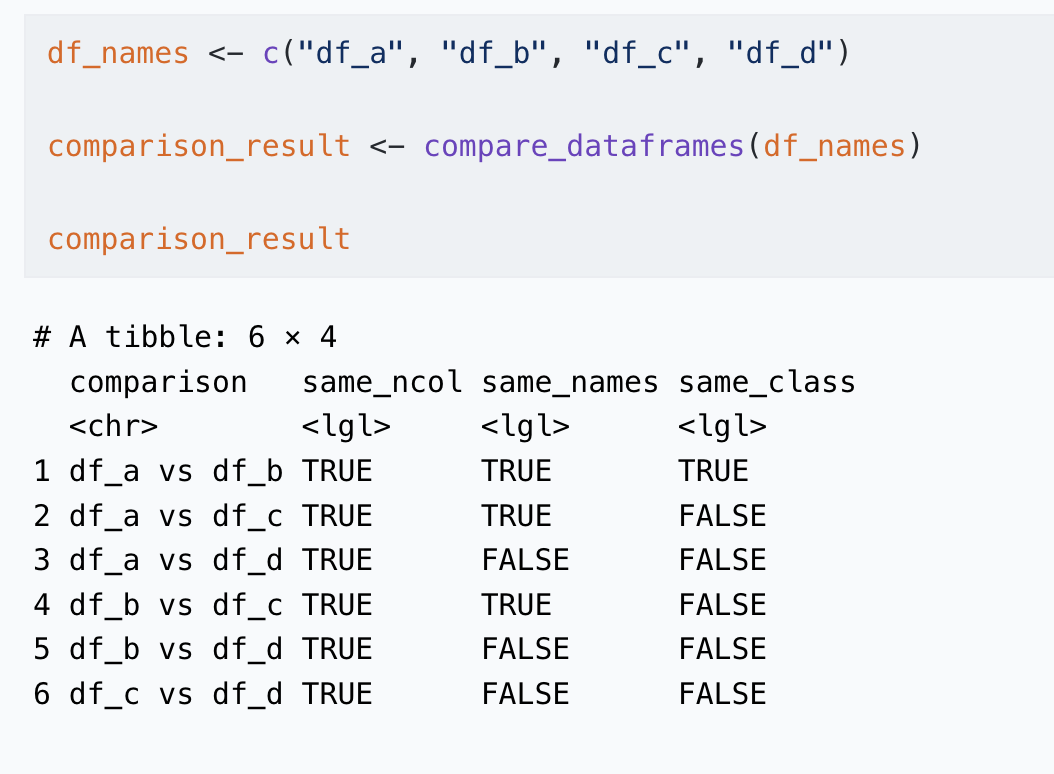
Provide the dataframe names as a character vector and invoke the function:
df_names <- c("df_a", "df_b", "df_c", "df_d")

comparison_result <- compare_dataframes(df_names)

comparison_result
# A tibble: 6 × 4
comparison same_ncol same_names same_class
<chr> <lgl> <lgl> <lgl>
1 df_a vs df_b TRUE TRUE TRUE
2 df_a vs df_c TRUE TRUE FALSE
3 df_a vs df_d TRUE FALSE FALSE
4 df_b vs df_c TRUE TRUE FALSE
5 df_b vs df_d TRUE FALSE FALSE
6 df_c vs df_d TRUE FALSE FALSE Step 3 – Interpret the results
The output table makes structural mismatches immediately visible:
same_ncol → different number of columns
same_names → different column names
same_class → same columns, but different data types
In the example provided:
df_a vs df_b → all TRUE (safe to bind)
df_a vs df_c → same_class = FALSE
df_a vs df_d → same_names = FALSE
This helps you catch issues before they turn into silent bugs.
In short
There is no single “official” way to compare many dataframes at once
Helpers like
compare_df_cols()from janitor are excellent for column-level inspectionThis custom helper function provides a clear, compact overview before stacking or merging data
Think of it as a pre-flight checklist before combining your data
Tip
If you want to stay up to date with the latest events from the Rome R Users Group, click here:
👉 https://www.meetup.com/rome-r-users-group/
And if you are curious, the full Kaggle notebook used for this tip is available here:
🔗 https://www.kaggle.com/code/lcolon/cyclistic-2023-google-da-capstone-project-r